

HTTP Status Codes: A Practical Cheat Sheet for API Developers
When working with REST APIs, understanding HTTP status codes is essential.
They tell you what happened to a request and help you decide what your application should do next.
Instead of memorizing every status code, start with this practical reference.
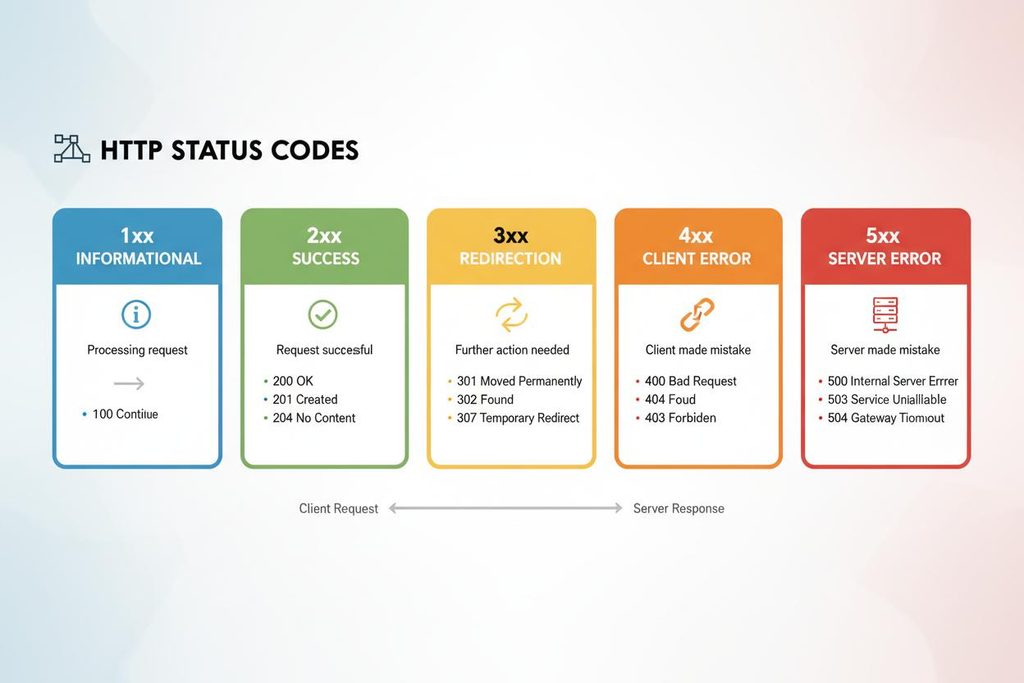
1. The Five HTTP Status Code Families
Every HTTP status code belongs to one of five categories.
RangeCategoryMeaning1xxInformationalThe request is still being processed2xxSuccessThe request was successfully handled3xxRedirectionFurther action is needed4xxClient ErrorSomething is wrong with the request5xxServer ErrorThe server failed to handle the request
Quick rule:
- 2xx: Check the result.
- 3xx: Follow the redirection when appropriate.
- 4xx: Check the request.
- 5xx: Investigate the server or temporary failure.
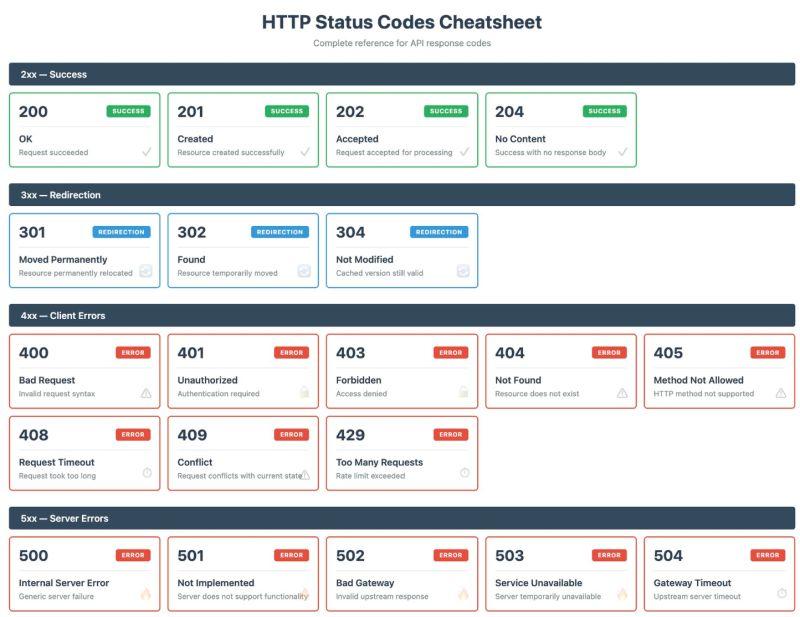
2. HTTP Status Code Dictionary
The most common HTTP status codes you’ll encounter when building APIs.
1xx — Informational
CodeNameMeaning100ContinueThe server allows the client to continue sending the request101Switching ProtocolsThe server is switching communication protocols
2xx — Success
CodeNameMeaningTypical Use200OKRequest completed successfullyRetrieving or updating data201CreatedA new resource was createdCreating a user202AcceptedRequest accepted, processing not finishedBackground jobs204No ContentRequest succeeded without a response bodyDeleting a resource
3xx — Redirection
CodeNameMeaningTypical Use301Moved PermanentlyResource has a new permanent URLPermanent URL changes302FoundTemporary redirectionTemporary URL changes304Not ModifiedResource hasn’t changedBrowser caching307Temporary RedirectTemporary redirect preserving the HTTP methodTemporary API redirects308Permanent RedirectPermanent redirect preserving the HTTP methodPermanent API redirects
4xx — Client Errors
CodeNameMeaningTypical Use400Bad RequestRequest is invalid or malformedInvalid JSON401UnauthorizedAuthentication is required or invalidMissing or expired token403ForbiddenClient doesn’t have permissionInsufficient permissions404Not FoundResource doesn’t existMissing user405Method Not AllowedHTTP method isn’t supportedPOST on a GET-only endpoint408Request TimeoutServer timed out waiting for the requestIncomplete request409ConflictRequest conflicts with the current resource stateDuplicate resource410GoneResource is permanently unavailableDeleted resource413Content Too LargeRequest body exceeds the allowed sizeLarge file upload415Unsupported Media TypeContent format isn’t supportedWrong Content-Type422Unprocessable ContentRequest content cannot be processedValidation errors429Too Many RequestsClient exceeded the rate limitAPI rate limiting
5xx — Server Errors
CodeNameMeaningTypical Use500Internal Server ErrorUnexpected server failureApplication exception501Not ImplementedServer doesn’t support the requested functionalityUnsupported feature502Bad GatewayGateway received an invalid response from another serverFailed upstream API503Service UnavailableServer is temporarily unavailableOverloaded service504Gateway TimeoutGateway didn’t receive a timely responseSlow upstream API
3. What Should Your Application Do?
Knowing the status code is only the first step. Your application also needs to react appropriately.
Status CodeRecommended Action200 / 201Process the successful response202Track the operation until completion204Treat as success without expecting a response body301 / 302Handle the redirect according to the API contract400 / 422Validate the request and show useful feedback401Refresh authentication or request new credentials403Check permissions; don’t blindly retry404Check whether the resource exists409Resolve the conflict before trying again429Respect the Retry-After header when provided500 / 502 / 503 / 504Consider controlled retries when safe
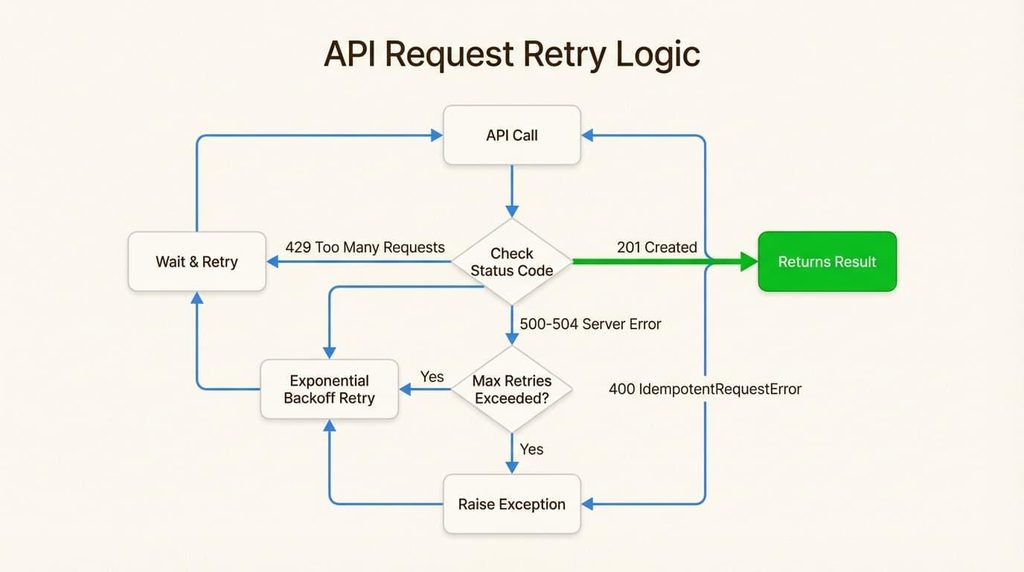
Important: Not every error should trigger a retry.
A 422 validation error won’t disappear by repeating the same request. A 503 might be temporary, but retrying too aggressively can make the situation worse.
Always consider idempotency, retry limits, exponential backoff, and timeouts when building external integrations.
4. Quick HTTP Status Code Reference
Keep these rules in mind:
- 200: Everything worked.
- 201: Something was created.
- 202: Accepted, but not finished.
- 204: Success, no response body.
- 301: Permanently moved.
- 302: Temporarily moved.
- 304: No changes.
- 400: Invalid request.
- 401: Authentication required.
- 403: Access denied.
- 404: Resource not found.
- 405: Wrong HTTP method.
- 409: Resource conflict.
- 422: Validation failed.
- 429: Too many requests.
- 500: Internal server error.
- 502: Bad upstream response.
- 503: Service unavailable.
- 504: Upstream timeout.
Final Thoughts
HTTP status codes are more than numbers in an API response. They communicate what happened and help your application decide what to do next.
Save this reference and use it whenever you’re building, debugging, or integrating REST APIs.
You can’t control every API response, but you can control how your application handles it.